


Datei:Leica Figure4.png
Aus exmediawiki
Fehler beim Erstellen des Vorschaubildes: Datei fehlt
Weitere Auflösung: 2.156 × 826 Pixel.
Originaldatei (2.156 × 826 Pixel, Dateigröße: 215 KB, MIME-Typ: image/png)
Beschreibung
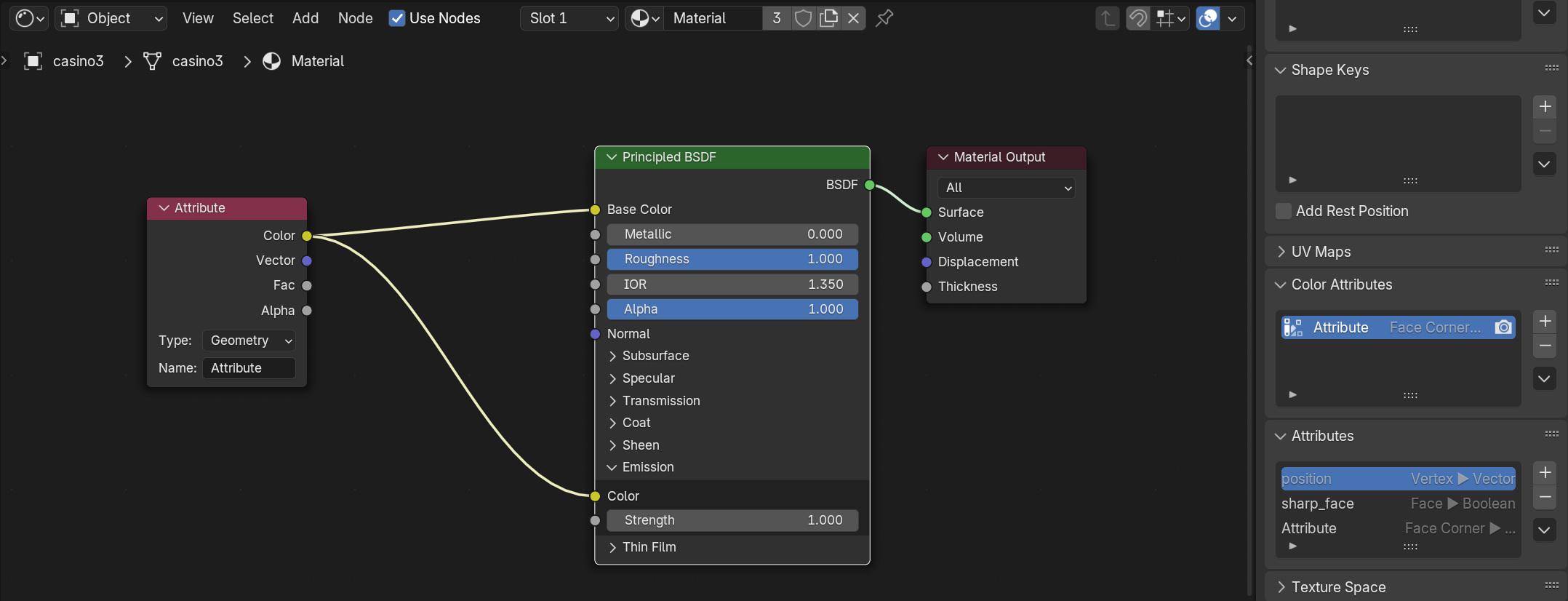
Figure 4. In the Shader Editor, add an Attribute Node and connect its output to the Base Color input of the Principled BSDF (or another shader). It is important to know the exact name of the vertex color attribute, by default it may appear as Attribute or Col. Type or paste this name into the Attribute Node, so the material reads the correct data. Make sure the Set Material node (in geometry node) is referencing the right material.
Dateiversionen
Klicke auf einen Zeitpunkt, um diese Version zu laden.
| Version vom | Vorschaubild | Maße | Benutzer | Kommentar | |
|---|---|---|---|---|---|
| aktuell | 15:37, 1. Okt. 2025 | Fehler beim Erstellen des Vorschaubildes: Datei fehlt | 2.156 × 826 (215 KB) | Shuree (Diskussion | Beiträge) | Figure 4. In the Shader Editor, add an Attribute Node and connect its output to the Base Color input of the Principled BSDF (or another shader). It is important to know the exact name of the vertex color attribute, by default it may appear as Attribute or Col. Type or paste this name into the Attribute Node, so the material reads the correct data. Make sure the Set Material node (in geometry node) is referencing the right material. |
Du kannst diese Datei nicht überschreiben.
Dateiverwendung
Die folgende Seite verwendet diese Datei:
